Wednesday, September 13, 2006

Article: "To 'Res' or not to 'Res'


Certainly most of us have decided at one point or another that we wanted a big print. Should we 'res it up' in Photoshop or another image manipulations software, or let the lab do it?

The answer may depend on the lab, the processing equipment or other considerations, but labs who use a RIP software sure can save you a lot of time. Taking a 24MB image up to 400MB can take quite a while.

Mighty Imaging shows a side by side comparison of an image that was res'd up in Fractals and the file as it was RIP'd on their Lightjet.

I use a RIP on my Epson 7600, and we have tested it by printing the same image three ways: res'd in Photoshop, res'd in Fractals and left at original capture and then RIP'd to the output size. The RIP'd image actually ended up as sharp, and with a bit more pleasant contrast than the other 2 ways. (Yes, we did the Photoshop at the 10% increment method... time intensive, but it does the best job.)
Mighty Imaging: Large Format Printing for Photographers, Corporate and Design Applications: "Some of our photographers prefer to 'res up' their images in Photoshop or Fractals. This results in a huge file, and that is certainly OK with us, but there may be another, simpler way. By using our RIP processor Mighty Imaging can take your image from the capture size to mural size with very little difference in the final image from the 'res'd up' file. This saves file size, allows for faster electronic transfer and saves the photographer lots of time. In addition, the photographer has to only keep one file at the original capture size."

Tuesday, September 12, 2006

Diego Ceja: Landscapes


Diego Ceja is one of our new photographers on Mighty Imaging's gallery site. Take a look at Diego's work. Stunning landscapes, ethereal spaces in nature, and a kind of 'fragmented' view of details.
"He holds a degree in Earth and Planetary Science from Washington University in St. Louis. It was while doing research on the salt domes in Utah that he became aware of the spiritual beauty of the desert. He was a wedding photographer and then a product and commercial photographer but returned to his calling as a fine art landscape photographer."

Mighty Artist receives national recognition

Judith Faust's image Moose Lodge Ladie's Room (scene on the right) was recently accepted in to a national competition organized by the Texas Photographic Society. The show opened at their Dougherty Art Center in Austin, Texas on September 1st. Congratulations Judith!

For more information on their events:
Texas Photographic Society Calendar

To purchase or view any of Judith's fantastic work go here.

Sunday, September 10, 2006

Risking death...

or at least a severe cold... photographers will do what it takes to make images this stunning. You absolutely must check Chromasia's Photo Blog as often as possible.
c h r o m a s i a / photoblog / wyre wreck #9
We checked the tide times on Paul's web-enabled phone, and confirmed that high tide was 11.36pm. So, almost high tide, but we were getting our feet wet. We decided to climb aboard one of the boats I'd photographed before – wyre wreck #5 – and wait until the tide receded. We took a few shots and noticed that the tide was still rising – it was now about a foot deep around the boat. We pondered for a while, and it got deeper. At this point it was beginning to look as though we were stuck on the boat for a while.

Friday, September 08, 2006

Interview: Ralph Gibson


One of he icons of fine art photography, Ralph Gibson shares his insight and vision. Well worth a read.
Ralph Gibson: "Chris/Larry: Let us begin with a question about your vision. Your work has an extraordinary balance in it, a certain kind of energy to it. Can you tell us about your state of mind when you are shooting?

Ralph: Well, for the longest time I have known that photography for me is not directly linked to an external event. For example if I say that tomorrow there’s going to be an execution at 12 o’clock. You get there, we can all win a Pulitzer prize. If you get there at 12:01 you miss your shot, as it were. So, what I wanted to do, is be able to make my perception of anything become the subject itself. And for this reason I’ve attempted to take pictures of simple things, you know, like a cardboard box, or a chair, or a spoon. Very humble objects. I’m not terribly drawn towards the epic event. I’d like to make something totally insignificant into an object of importance, by virtue of how photography works."

Thursday, September 07, 2006

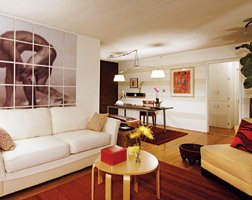
Get a bigger room without using a sledgehammer


I came across this article that gave some great ideas on how to decorate a small room to make it feel...well, roomier.

4) Cover an entire wall with a large poster, print or photograph and then pull your sofa away from the wall (see picture above). This creates the illusion of higher ceilings and allows for some breathing space.
Little Big Room - House Beautiful

Tuesday, September 05, 2006

Lovin' that Pinhole Photography


A great list of Pinhole Photography books including reviews. If you enjoy this laid-back approach to images, take a look at this fairly comprehensive listing of books you will like.
Product Listing - Books: "Included in the 'how-to' chapters are directions on how to make and use pinhole cameras, explanations on avoiding the most common mistakes, calculating exposure times, charts and formulas for optimal pinhole diameters, making and measuring pinholes, filtering, various camera designs including wide angle, 1:1, telephoto, multiple pinhole, digital pinhole, and extensive information on how to use zone plates. Includes lengthy chapters on the history of pinhole in both art and science, pinhole's renaissance from the 1960s to 2004. Many contemporary images are shown throughout the book. Includes new chapters on camera obscuras and digital pinhole. This book is a must for anyone interested in pinhole photography!"

Sunday, September 03, 2006

For Labor Day

A look at cities, the working man*, and some really cool images.
Sleepy City is photographically deconstructing the urban environment. Underground tunnels, derelict industrial sites and urban ruins are where I like to play. Discarded by society, these forgotten nooks and crannies wait quietly for the occasional urban explorer. Grab a torch and have a wander; you might be surprised how little of your city you have ever appreciated.
Here's a nice little site with some very cool black and white images. Urban photography at it's best.
I have photographed the urban environment for over twenty years. Emanating from my interest in sociology and history, I am fascinated by the ways cities are organized and by the stories the buildings and the streets tell. People are rarely seen in the photographs but their presence is certainly felt. Recently I have begun to photograph rural settings in addition to my ongoing urban photography. While these environments different from the city, I am drawn to the same graphic elements and to the stories contained therein.
I have Nitsa's book, "Streets of New York" and like it a lot. I bought a copy of it over at Cafe Press really to see the quality of the printing. I have been more impressed by LuLu for self-publishing photography books, but that is for another post.
Simply put street photography includes any photograph made anywhere in public places. Some people narrow it down to urban settings and some people think there must be people present in these kinds of photos. But the bottom line is that each street photographer will find their own meaning and approach therefore whatever definition they might arrive at will work just as well.
Then there is the wonderful work over at "Deviant Art." Pretty interesting.
THE URBAN PHOTOGRAPHY JOURNAL

The group of Deviant Art which is dedicated to the wonderful art and beauty of the city, and urban photography!
This is a very rich site of images, forums and resources. UrbanPhotos.org

Finally, enjoy the work of Gavin George. Shooting the urban landscape with lots of love for the subject.

Friday, September 01, 2006

Travel Guides: for Free

If you are planning a trip, you know, where you go somewhere and shoot images that will be printed really large at your favorite lab, you can use this cool site to download travel guides. Planning your road trip just got a little easier.

Thursday, August 31, 2006

Big 'Ol Cameras... for handholding!

No rosewood here. No gold plate, no hand rubbed finish. No attitude. Its bloodline is more Jeep than Rolls Royce. We wanted a large format 8x10 camera that could ride in the trunk with the spare tire and jack and feel comfortable. We wanted an 8x10 that could be hand held. We wanted a lot. This is it.
Take this rugged lightweight instant-ready camera with you wherever you go and you are loaded for bear -- literally!
And here's an interesting article on shooting very large cameras.
Frustrated with the d.o.f. problems of larger formats (in terms of working speed/spontaneity, not results), I've been fascinated with fixed-focus larger-format "cigar box" cameras. I purchased the 8x10 Hobo (www.bostick-sullivan.com) and it worked well (I probably wouldn't have bought it if I didn't already own the 120SW lens for 4x5). I modified the Hobo a teeny bit, adding a metal handle (w/built-in thumb-operated cable release) on the right side (after finding that gripping the camera with my right hand often flexed the film holder, causing light leaks). I also replaced the four lens board bolts with wingnuts and cut a set of lensboard-shaped gaskets (out of mat board, each maybe 1/16" thick) so that by undoing the wingnuts I can (relatively) quickly add or remove gaskets to change the optimal zone of focus from, say, 100 feet to 12 feet (yes, everything is supposed to be in focus from 4' to infinity with the 120mm/f8 lens, but of course that isn't really true; I figured it'd be nice to be able to alter the focus distance at least for infinity landscapes/cityscapes vs. closer street/people shooting). This camera made possible some shots that would have been much more difficult with conventional 8x10 cameras (e.g., handheld shooting from atop a huge ferris wheel and from a helicopter flying over downtown Chicago).

Location Scouting?

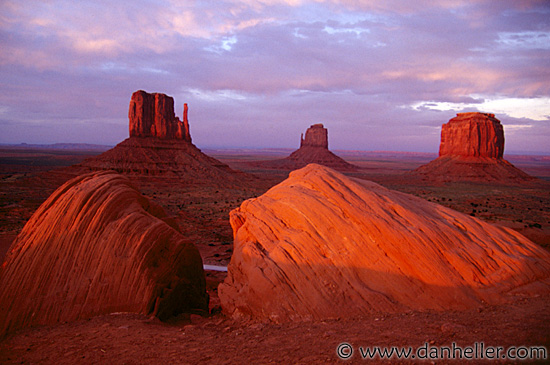
Here's a good site with some images from the great southwest parks and monuments. It could be a resource for finding your next shooting trip.

Dan Heller has a nice essay on Monument Valley.
Monument Valley is considered one of the natural wonders of the world because of the beauty of the enormous "monuments" of stone that have evolved from nature: wind and rain chip away at the land over millions of years, eroding the plateau, leaving a vast landscape of tourist opportunities. While the land belongs to the Navajo Indians, the park has been open to tourists since even before the beginning of the frozen yogurt machine. And might I add that one cannot buy higher quality frozen yogurt anywhere else in the Navajo Nation than in the majestic land that is: Monument Valley.
And here from PhotoTravel's site:
Monument Valley has magnificent scenery with huge mesas, stunning buttes, and delicate pinnacles in dramatic formations on a flat desert plain. These stark formations are the "monuments"--their red colors standing out in sharp contrast against a deep blue sky, while ever changing light and cloud shadows create new images. First-time visitors are surprised to learn Monument Valley is not a national park. It is a tribal park administered by the Cultural Resource Department of the Navajo Nation. Indians still live in Monument Valley, herding sheep and goats, weaving rugs, and using hogans-- mud and log structures.
Here's where I stay when I go to Monument Valley.
Deep in the heart of the American Southwest, Goulding's Lodge offers lodging with unprecedented amenities, along with providing unique expeditions enabling the guest to search out the mystery and wonder that is the Navajoland.

Duratrans in a new light


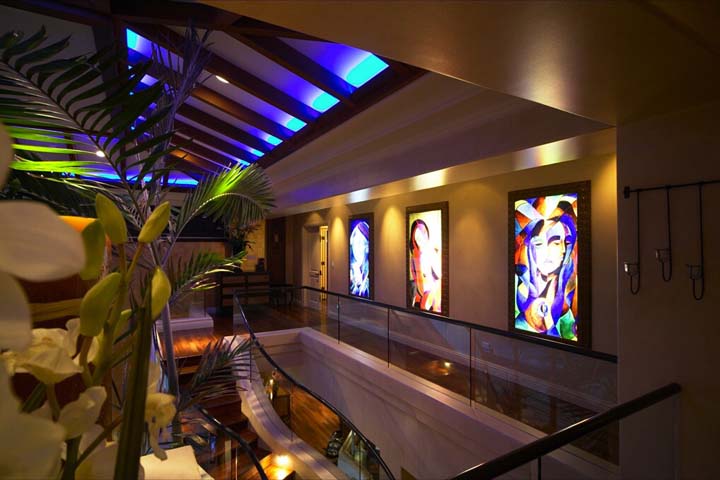
Boy, would I love to spend a week in this house. This house has been spread around the web and email to be Tiger Woods house. It isn't. It is just a luxury rental in Maui. What caught my eye was their use of three large framed Duratrans displays for artwork at the top of the stairs. It shows the dynamic versatility of the material.

If you want to get some great ideas on what the Duratrans can be used for or you just want to dream of a luxurious island get-a-way check out this site: Maui Vacation Palace

Wednesday, August 30, 2006

(Just Like) Starting Over


David Spindel's images of John Lennon's last recording session will be on display in a Seattle production of a play based on John Lennon's life opening on September 7th. Congrats, David! To own one of these amazing images yourself check out David's gallery.

Tuesday, August 29, 2006

Mighty Imaging and the PHOTOtool


Aaaah... a marriage made in, well, you know. Mighty Imaging has a great plan for helping photographers sell more images... let photographers show their images on the MI site, and offer excellant printing and lightning fast delivery for designers, art buyers and consumers world wide.
But finding a web solution was more than a bit daunting. After searching a bunch of solutions, MI finally settled on the PHOTOtool for the favorites/shopping cart functionality. Initially the PHOTOtool was unable to achieve the functionality that was necessary for this multiple photographer site. Daniel altered a couple of areas in the code and it is working fine now. You can see it in action on the site now. Check out the gallery feature and find an image to print for your wall.
(Full disclosure: While I blog here at Mightyimages, I am also an owner of the PHOTOtool. We had originally thought that the PHOTOtool would not be a good match for MI, but in the end, with a bit of customization, it seems to work well.)

Monday, August 28, 2006

Photo Puzzle Art


This could be a fun photo project. Why stop at an 11x14 size, why not 20x30? Or as long as your arms will reach.

Decorating : Photography : Photo Puzzle Art : Home
Photographer Betsy Wynkoop shows host Renai Ellison a creative technique for displaying photography in a very personal way (see photo at right).

Thursday, August 24, 2006

File Sharing Roundup

Photographers have large files. Clients need to get those files. There is always a search on for the most efficient ways to get image files to clients, especially large files. File sharing may answer that problem. Trusted networks and user-defined security make yesterday's "napster-like" file sharing into a very powerful tool for photographers and their clients.
Techcrunch » Blog Archive » Let’s Share Some Files - Four Services Compared: "File sharing has long been a popular use of the Internet. I remember sitting at my laptop and asking a friend to name a song, and then seeing if I could download it off of Napster and play it before he could find the cd on the shelf, put it into the player and play the song himself. I often won those competitions.

The old Napster is long gone, but was of course replaced with many other P2P networks. Today, a significant portion of Internet traffic is comprised of files being moved over bittorent, a popular and completely decentralized way of sharing files."

Wednesday, August 23, 2006

Photoshop Tutorial Movie


Over at my workshop site, I have posted a fun little movie on making a portrait look like it was shot on a view camera with a lot of tilt action. Enjoy.
"I Just call this freeform."
"This is just a fun little movie. I have no preconceived ideas going into it and it works out well with a very interesting portrait reminiscent of a view camera, tinted photo. Follow along for fun."

Tuesday, August 22, 2006

Jim Cowlin's Road Trip


Arizona photographer (and Mighty Imaging artist) Jim Cowlin has been photographing Route 89 for many years. He is using the web to help him finish the project. Check it out and become a member of his project. Jims images can be seen at the Mighty Imaging site and his website.
US Route 89 Appreciation Society: "US Route 89 from Desert to Glacier: A Photographic Exploration of the Geography, History & Culture Along the West’s Most Western Highway

Photographer James Cowlin has begun work on a traveling exhibition and large-format book of photographs of the landscapes along US Route 89. A traveler’s field guide is also planned that will connect the geography and history of the West to places along the road. The project is scheduled for completion by the fall of 2009."
Don will be interviewing Jim about this new project soon and we will carry some of that interview here. Coming soon.

Monday, August 21, 2006

Skin Tones

Skin tones can be a challenge. Here's a couple of articles to simplify the task of making people look less alien-like.
Photoshop Color Skin Tones Tutorial
For those interested in coloring graphically upon the computer, painting, pastels, colored pencils, markers, and any other coloring tool, skin tones are necessary part of human color. The worl is full of variety in color, including the human skin. I look around, and I see many people getting the skincolors wrong. It can be too yelow, too pink, or just not the right color. Getting a realistic skintone can be a really tricky business, but, there is an easy solution to this delimma. I created this tutorial for Photoshop on Photoshop 7. I'm not sure what else will be compatable before Photoshop 7, or other products, but I would think that the steps would be similar.
Here's another short tutorial.

Sunday, August 20, 2006

A sunday 'Sharpening' roundup

Big images call for close attention to sharpening. Here are some different views on a subject that ae
Sharpening with Unsharp Mask: "Sharpening filters emphasize the edges in the image, or the differences between adjacent light and dark sample points in an image. The generic Sharpen or Sharpen More filters are often for graphics, and are less suitable for color photographic images. However, filters do vary, the name 'Sharpen' is vague and is not always very descriptive, it is hard to say what they do. But the UnSharp Mask is where the action is for photographs, the standard tool. It offers the necessary greater control."
Here's a nice technical discussion...
Basically, the script works on smaller photos 70mb tiffs but throws up errors when trying to open them when used with larger photos (400mb-470mb). I have tried limiting the script to 8 bits per channel to ease the processing as well as limiting the memory to 5gb (3gb ram 2.5gb swap space). I am using a 2.6.14-2-k7-smp kernel and using debian & imagemagick 6.2.4 which is Q16 (memory has been memtested)
Here is yet another view... at Imaging Resource
In many of the articles on this site, we covered a number of ways to improve your photos digitally, including adjusting tonal balance, and "cloning out" distracting image elements. This time, we're going to drop down to a less obvious level, and deal with the much-maligned and misunderstood technique of image sharpening.
I say "maligned and misunderstood" because many people only use the "sharpening" tools in image editing programs to try to correct for blurry or mis-focused original images. Worse, some manufacturers of low-end editing programs (e.g., Microsoft, with PictureIt) felt that "sharpening" was too technical a term, and so changed it to the more (mis)understandable term "focus." Aarrgghh! (Sorry, I had to get that out of my system.)
And byThom offers this post:
Sharpening is easy to understand at the simplest level—given two digital photos, one sharpened and one not, you’ll always point to sharpened one as having more detail and being “better focused.” Yet, if you were confronted with two sharpened photos, one well done, and the other less so, you might not be able to differentiate between the two.

Unfortunately, most digital photographers have learned sharpening by fixed rules that specify exact values to use in Photoshop's filters, and therefore neither understand why they use the tools they do, or how they might be using them rightly or wrongly. This article attempts to clarify the problems created by digital imaging, and how to apply the correct amount and type of sharpening to fix them.
Now... this looks pretty cool.
Refocus-it was written by Lukas Kunc and the “it” also stands for iteration, because that’s the approach the algorithm (a Hopfield neural network) takes in order to restore image information. Whether or not it’s working is what I’m trying to demonstrate with two test cases: One with an extremely and another with a slightly blurry image. In both cases I tried to enhance the image with an unsharp mask and the refocus-it plugin just as comparison in regard to the plugin’s effectiveness.
I will have to check that out.

Next up - a step-by-step tutorial. Simple, but well stated.
Basic Sharpening
Sharpening is normally the last thing you do before saving a file. There are many ways to sharpen an image in Photoshop. This tutorial describes the main sharpening method using the Photoshop Unsharp mask filter and includes some sample settings and describes when you might use them.
Have a great weekend, and stay sharp!

Friday, August 18, 2006

Panoramic Cameras

Are you considering a wide view for the Fall?
Panoramic camera advice: "A true panoramic camera records an image over more than one film frame, giving an image with elongated proportions. There are many specialist cameras to choose from with this unusual, but very useful, format and below are ones you can consider."
Here is an interesting report on an inexpensive model.

The Russian Horizon 202 is a fully mechanical 35 mm camera with a 28 mm (f2.8-f16) swing lens design covering 120° horizontally and 45° vertically.

Horizon 202, front viewIt is manufactured by KMZ – Krasnogorsky Mekhanichesky Zavod (Krasnogorsk Mechanical Plant) – in Krasnogorsk. KMZ is also known for the Zenit and Zorki cameras and is the largest producer of photographic equipment in Russia and the former Soviet countries.

And for you DIY'ers out there...
Some years back, we published an article showing some panoramic pictures taken with a handmade panoramic camera. We also said that in time we would publish an article on the construction of this camera, but we were putting it off for several reasons, the main one being that building this camera is a demanding task and we wanted to publish some simpler articles first. Nevertheless, many readers continued to write to us asking when this article would be published, pressing us for its publication, reproaching us, even if amiably, because we hadn't done it yet. Well we could delay no longer so here it is. If the fabrication of this camera is too demanding, please forgive us and make note that we have also supplied some simpler methods for making panoramic pictures.
And one more... A decent roundup of articles.
Digital images can be readily stitched to make panoramas. Probably the best software available for this is the free Panorama Tools, and there are several Windows and Mac front ends to make this more user-friendly, including the free Hugin project.

Thursday, August 17, 2006

Wegman's Weimaraners


Do you love dogs? Do you love photography? I know I do. If you are going to be in the nation's capitol before the end of September check out this exhibit of Wegman's infamous weimaraners:
William Wegman-Funney/Strange
07/01/2006 - 09/24/2006
Smithsonian American Art Museum
Family, Young Adult, Adult
William Wegman (b. 1943) is beloved by the public and held in critical esteem by the international art world for his smart, gently subversive humor that parodies all things familiar. "William Wegman—Funney/Strange" is the first in-depth look at the artist in 15 years and examines his work in all media from the 1960s to the present. The exhibition will feature photographs, works on paper, paintings, conceptual work, videos, writings and rare archival materials. Several surprising new bodies of work will be seen in relation to classics, such as the photographs of his weimaraners.

The Reynolds Center - Calendar

Sunday, August 13, 2006

Digital Art - By Nelson Teixeira

Wow... imagine these images at 40x60 in your conference room. Nice work. Would look really cool large.
BubbleShare: Digital Art - By Nelson Teixeira

Saturday, August 12, 2006

It's Hot. Let's go to the mountains...


Weekend travelers going to the high country. Ahhh... But if you can't go, or are stuck at home this weekend, let us travel to the peaks virtually. Here are some fun mountain shots. As always, we think they would look cooler printed really big.

Our first post is a great set of images of the Rocky Mountains. The website isn't very good, but the images are excellent. Enjoy looking around here.
Pictures of Colorado and the Rocky Mountains
Can't even speak about mountain photography without looking at the astounding work of Galen Rowell. Some poeple leave too soon. We miss Galen's incredible eye.
Born in 1940 in Oakland and raised in Berkeley, California, to a college professor and a concert cellist, Galen was introduced to wilderness before he could walk. He began climbing mountains at the age of ten on Sierra Club outings, and at sixteen made his first roped climbs in Yosemite Valley. Over the next fifteen years he logged more than a hundred first ascents of new routes there and in the High Sierra backcountry.
Alex Milne's Mountains are ethereal.
Mountain Photography.net is founded and maintained by me - Alex Milne. I welcome the participation of any photographers who share my passion for the high mountains.
Ok... once you figure out how to work the damn web site, the images are really fine. (I should do a rant sometime on why photographers think they should have some techie looking site... sheesh). Anthony Nielson's work is way better than his site. Take a look....

Aaahhh... a guy, a mountain, a point-and-shoot and, voila, instant cool mountain shots. A good eye helps as well.

Betty Shelton loves the Smoky Mountains. You can see it in her lovely work.

And some food for thought from Travel Quest.
Mountains are by nature photogenic, but it is not always easy to capture their scenic grandeur in a photograph. The first requirement is to use decent equipment – simple point-and-shoot cameras, either using film or digital, can yield good results, but for most purposes,a good quality 35 mm camera with a selection of lenses is necessary.
Some good advice here as well.

Words and pictures Colin Prior

'An image doesn't start with a camera - it ends there.' is a useful maxim borrowed from one of the National Geographic Photographer's Field Guides.

Its simple, concise message serves to remind photographers that it is what lies 'beyond the lens' that should command their attention. Nevertheless. For each assignment it is essential to have the right photographic equipment at hand, together with an understanding of its limitations.

We close for now with some outstanding images from Willie Holdman.

“I had visited this meadow several times and each time offered a different reward. This autumn day had a blanket of gray across the sky. As I reached the crest of the meadow the sun had managed to pierce through the clouds and illuminate a ridge of aspens. Just as I had prepared my camera, another ray of light danced across the top of Mt. Timpanogos. A photograph was taken.”

Friday, August 11, 2006

When do you need permission to photograph someone?

Asked and answered at Digital Photography School.
Asking Permission to Photograph People: "1. I always ask for permission if the person will be the main subject of my photo - I figure that I’m a guest in another country and that I want to behave like I’d expect someone to behave if they were in my home - with respect and friendliness.

2. If a person is a minor subject in a larger photo I don’t seek permission - it’s just not logistically possible to ask everyone on a street if you can photograph them!"

Wednesday, August 09, 2006

Feral Flowers

Hey. you like landscape photography? You like wildflowers? You like desert floors covered with color? Good. We do too. We think they make great statements when printed as wide as possible. Need some inspiration, or just want to see some amazing desert floral images? Here ya go.
Feral Flowers - Desert Wildflowers - Visions of Ephemeral Eden - Landscape Photography: "This rare wildflower landscape portfolio represents a 20-year historical documentation of a phenomenon in the Californian deserts known as 'carpet blooms', the surreal display of flowers on a scale and magnitude unseen anywhere else on Earth. A Force of Nature born from an extreme land of mountains, deserts, faultlines and sporadic seasonal rains, a unique biodiverstiy hotspot listed by Conservation International as endangered.

Most of these landscape vistas so revered by Native Americans and romanticized by early Californian explorers have only appeared once in 20 years of photographing them. Many seasons these inconstant flowers appear in different locations, even after winters of copious rain there may be none at all. The same density or type of wildflowers may never bloom for 25 to 100 years.
"

Photographing Fall Colors

A simple page on tips for shooting autumn colors in the desert.
Desert Gold - Photographing Fall Colors in Utah's Desert from Wild Things Photography: "When one thinks of fall colors, that image conjured up is usually of a location somewhere in the NorthEast US. Nobody really think of the desert. But don't forget that deserts have oases, and those oases can produce some stunning color that rival those of the east."

Tuesday, August 08, 2006

The best of both worlds

This is an older article that just came to my attention. If you love your windows software, but are 'jonesin' for a Mac... check this out. I think this could be very substantial for photographers wanting to take advantage of cool Windows apps like Picasa, while keeping with their legacy Mac software. The key here is you don not have to reboot, like Mac's "Bootcamp" tool.
Run Windows and Mac OS Both at Once - New York Times: "Boot Camp's problem, though, is right there in its name: You have to reboot (restart) the computer every time you switch systems. As a result, you can't copy and paste between Mac and Windows programs. And when you want to run a Windows program, you have to close everything you were working on, shut down the Mac, and restart it in Windows — and then reverse the process when you're done. You lose two or three minutes each way.

NO wonder, then, that last week, the corridors of cyberspace echoed with the sounds of high-fiving when a superior solution came to light. A little company called Parallels has found a way to eliminate all of those drawbacks — and to run Windows XP and Mac OS X simultaneously.

The software is called Parallels Workstation for Mac OS X, although a better name might be No Reboot Camp. It, too, is a free public beta, available for download from parallels.com. You can pre-order the final version for $40, or pay $50 after its release (in a few weeks, says the company)."

This is great for printing web pages

Many times we want to print the information from a page and then sit helplessly watching all the color ink get used up in the banner images, backgrounds and such. This Firefox extension really helps when you need to print something just for the, you know, content. BTW... with two daughters in school, this should help reduce some color ink refills.
Aardvark Firefox Extension: "Clean up unwanted banners and surrounding 'fluff,' especially prior to printing a page"

Horses by Michael Eastman


Gorgeous images here. No text, just 9 images of horses that are astounding. Michael Eastman is a reknown photographer, get to know his work by clicking around here.
R. Duane Reed Gallery - Images for Michael Eastman - Horse Series
Update: More images here.

How to Mount a Print

Simple DIY instructions for matting and presenting images. You may already know most of this, but a little refresher is always a good idea.
Mount a Print: "Photographic prints should be mounted so they can be removed from the mount easily, and cannot contact the glass if they are framed. This is done using a window overmat."

Monday, August 07, 2006

Cloning For Political Advantage

After the news this weekend that a certain Reuters news photographer has been faking images, (besides the example below, there are more of this guys work coming out with captions that are predating the event and more) I can't help but wonder how much we are told is real, well, isn't. Photoshop used as a political weapon can be very powerful, especially when probably 95% of the people that saw the shot never knew that it was eventually exposed and removed... they just remember the phony image. Thanks, Kevin, for this unique thread...
SportsShooter.com - Odd photo from Lebanon...: "->> I know that building plans are often reused in other parts of the world, but if you look at the building that's the apparent source of the plume on the left (as well as the next two buildings to its right) it appears that it's been rubber stamped at least two other times up and to the right. "

Update: Looks like Reuters finally gets it. BTW... this is not a political post, this is a photographer post. This kind of deception simply undermines our profession. I am glad that there is a public outcry and that it is being dealt with.
LONDON, Aug 7 (Reuters) - Reuters withdrew all 920 photographs by a freelance Lebanese photographer from its database on Monday after an urgent review of his work showed he had altered two images from the conflict between Israel and the armed group Hizbollah.

One More Week to Enter...

Hey, Hot Shot!: "On Wednesday September 6, 2006 jen bekman will present the Summer 2006 edition of Hey, Hot Shot! Winners' Showcase, an ongoing series of exhibitions by emerging photographers.

Enter your photography in to the Hey, Hot Shot Summer competition. If you're selected by our panel of experts, you will be:
*featured as one of 10 photographers in the Hey, Hot Shot 2006 Summer Showcase
*represented by jen bekman : in the gallery's inventory and on its website.
*eligible to be one of 4 finalists who show in the Hey, Hot Shot Annual, and be represented by jen bekman through 2007 ."

Wednesday, August 02, 2006

Charles Brooks receives a mighty honor

We love our mighty artists. It is always good to see them get the recognition they deserve.

Charlie Brooks' Havasu Heaven was recognized this month by the Professional Photographers of America as one of their membership's outstanding photographs. The PPA accepted Charlie's print into their 2006 Loan Collection. PPA will exhibit this print along with other Loan Collection recipients' in their world tour exhibit. Additionally, PPA will publish their annual Loan Collection book in December including images from all the recognized photographers. Typically, only 13% of PPA's national membership of photographers achieve Loan Collection acceptance. For Charlie, this is his third. Congratulations!

You can see more of Charles' work and buy his artwork here.

Tuesday, August 01, 2006

Photoshop - the power to create...


...whole new realities. Brian Dilg Photography.
Mouse over the image to see the unretouched original. This image for Bravo's Project Runway involved a lot of changes to the set, replacing the head on the woman at the back, lots of cosmetic skin work that won't be apparent in this little JPEG, and of course plenty of digital flattery. All par for the retouching world these days.
I do plenty of photoshopping as well. This work is very well done.

"I was framed, man..."

We were working with a client on some fabulous nature images and we started looking for a unique way to frame them. We found some cool resources along the way. Thought we would pass them on.

This site features premade small frames and the ability to quote custom for the really large frames we love.... Talk about making a statement!
Custom Barnwood Picture Frames: "Custom barnwood picture frames are no problem because we make all custom frames lovingly and carefully by hand--the same way we make all our picture frames. Included on this page are two custom calculators to assist you in determing our pricing on custom picture frames. Please note that we do not offer glass larger than 12 X 16. This is because it will most likely break in transit. So, if you need a custom picture frame that is larger--like a 10 X 20 frame, or a 18 X 22 frame or even a 5 X 36 size frame--or if you do not require glass, use the 'Custom Picture Frames without Glass' calculator. Otherwise, use the 'Custom Picture Frames with Glass' calculator to determine the price of your custom picture frames including glass. "
This site is an online only store. eFrame.net is your online picture frame outlet. We custom cut your picture frames to any frame size you need. Please compare the many different picture frame styles and colors at e Frame to any other online picture frame store.

There are also wonderful framers in your town. Visit them, pick one that has a good understanding about framing images and then work with them to create your unique frame styles.

Monday, July 31, 2006

Pano Tools (Free)

In the previous post I mentioned repairing the barrel distortion some lenses have. That prompted me to remember this cool little free tool for making panorama images. Check it out. Easy to use, however if you are not totally comfortable working in your PC system area, get someone who is to install it for you.

For your convenience I have compiled the Windows version of PanoTools library that is available on SourceForge. Currently this version is a little old but stable. The Field of View limit has been increased to 1000° from the normal 160.

Correcting Barrel Distortion

Interesting article that will show you how to correct the barrel distortion caused by many of today's digital camera lenses. (Now, if you paid 2K for that sweet Canon 85mm, f1.2... and you are still getting barrel distortion... well, you shouldn't be getting any distortion at all.) The settings that you create with this article will allow you to repair all images made on that lens with the same settings. Cool.
"The following examples demonstrate the use of my Photoshop/Gimp plug-in Panorama Tools to correct lens distortions. The most common and annoying lens error is barrel distortion, which occurs in many cheap wide angle lenses, especially in digital cameras or when using wide angle adapters. Straight lines are bent away from the center of the image: A rectangle looks like a barrel. Correction of these distortions is performed by shifting each pixel radially. The displacement is calculated using a polynomial function, whose coefficients are specific to the particular lens. Once these coefficients have been determined, they can be reused for each image: In practice the images should be batch-converted to correct these errors. Panorama Tools employs a high-quality sampling algorithm with negligible image degradation, so no new errors are introduced during this process."

Sunday, July 30, 2006

High dynamic range imaging - Wikipedia, the free encyclopedia

I was struck by this Wiki entry. I hadn't been using the term before, but it seems that this is what I do when I combine several images taken with different exposures... lightening the shadows and deepening the highlights. High Dynamic Range.. hmmm. 'K.
High dynamic range imaging - Wikipedia, the free encyclopedia: "HDRI provides the opportunity to shoot a scene and have total control of the final imaging from the beginning to the end of the photography project. An example of this control is that it provides the possibility to re-expose. One can capture as wide a range of information as possible on-location and choose what is wanted later."

Saturday, July 29, 2006

Weekender: Art Shows. Are they for you?


This long post really covers what you need to know before embarking on this type of endeavor. I personally know a couple of photographers who make substantial incomes from 3 or 4 of these a year. I also know a few who haven't made a cent. While there are reasons aplenty for both scenarios (and that could be grist for another post sometime) this article shows how careful preperation can go a long way toward a successful show.
Selling in Art Shows: "We all love taking photos, and that is why we are involved here at NPN. We sometimes see questions posed in discussion forums about ‘what is next’ or ‘why photograph’. One answer is to get your photographic work out among the public to share your vision and passion, and hopefully to find that others find your work exciting, and maybe even want to own some it. There are many other reasons as well why one would want to start selling photography in art shows. Regardless of the reasons, there are many factors to consider before starting this endeavor. This article will touch upon some of those considerations."
Here's another good post on Art Shows from Shutterbug.
Choosing Shows
We recommend that you only apply to juried art fairs, as this audience is more likely to be interested in purchasing original signed photographs. If you would like to get a bit of experience by doing small local events to start with, that is not a bad idea, but don’t be disappointed if your sales are not as high as you would hope. The big national and regional shows are where most serious art buyers go, and you should, too.
A long discussion on surfaces and paper at Luminous Landscape.

And another informative thread at Large Format Photography's forum.

From Entrepreneur.com comes this interesting piece. Not totally focused on photography, but interesting nonetheless.
Speer hasn't looked back once. Today, he and Banyas run a homebased business selling their whimsical mixed-media sculptures at art festivals and craft shows around the country, including the recent Coconut Grove Arts Festival in Miami where they rang up sales of several thousand dollars over the three-day Presidents' Day weekend. Despite an estimated $3,000 in travel and other miscellaneous costs, Speer and Banyas ended up making a tidy profit. Then they packed up their truck and headed home to Oberlin, Ohio, where they stayed for less than a day before traveling to another show in Baltimore.
One last posting to read: This list from ArtFestival.com:
  • Project a positive and upbeat attitude at all times.
  • Keep a guest book to accumulate names and addresses for your email or mailing list.
  • Mail or email a personalized flyer to your customers with a list of your upcoming shows once you are confirmed.
  • Be flexible and accommodating to your customers.
  • Keep your promises for deliveries, special orders, etc.Enjoy the weekend.
Enjoy your weekend!

A look at Mounting Display Prints

Nice, simple tutorial on mounting considerations.
Mounting Display Prints: "Photographers categorize their work with that of an artist or scientist, meaning they see photography as either an art or a science. No matter what school of thought you hold, it should still be your goal to have your prints viewed, appreciated, and most importantly, communicate your message. This is the reason that the salon mount came into use. In photography, this means a display print that is mounted for exhibition."

Friday, July 28, 2006

It's for an older version...

... but the tips here on using brushes is very good. One thing that is good about PShop is that what worked in 7 will probably work the same in CS2.
Jay Arraich's Photoshop Tips - Using PS7 Brushes: "t’s pretty frustrating to be in possession of the Photoshop 7 Brushes palette when you can’t paint a straight line. Luckily, there are still quite a few things that you can do that don’t require you to be a painter."

Thursday, July 27, 2006

Photoshop Filters, the complete freeware and commercial source.

I needed a specific look for shot I was working on last night. I found this site and it has a great roundup of filters and plug-ins. Check it out if you are looking for a single place to see lots of filters.
Photoshop Filters, the complete freeware and commercial source.: "This site is all about Photoshop compatible filters for the PC. As you browse the site, you will discover over 300 pages packed with thousands freeware and commercial Photoshop filters available from the best authors on the Internet. Each page displays the 'Master Image' of the lion and the result of each Photoshop filter has on the image."

Wednesday, July 26, 2006

We are proud of our gallery photographers

So we created a little slide show for you all.

Ocean Photography - Andrew Kidman

Inspirational images of waves, surfing, the ocean and beaches. A pro-am shooter that captures the beauty of the sea in many different ways.
Ocean Photography - Andrew Kidman: "
I love taking photos of the ocean in all its' moods, it's very similar to surfing. I enjoy riding the waves with my eyes when I'm taking the photo and again when I'm looking at the processed image. I began photographing the ocean when I was a child. I was drawn to it for its beauty and it continues to draw me in today.

I've done a small amount of commercial work with my girlfriend Michele Lockwood's clothing company MATERIAL. I enjoy working with Michele because we're always immersed in nature. We go to beautiful parts of the world to photograph the clothes. This is enough in itself."

Tuesday, July 25, 2006

Donate Your Old Cellphones, PDAs, and Digital Cameras For Charity - Gizmodo


Hey if you have some things to donate, this is a very good cause.
Gizmodo readers love having the latest and greatest cellphones, PDAs and other mobile electronics. However, this means they have a whole bunch of older gear that are sitting, dusty and unwanted, in the basement. Why not do some good by donating it to charity?
Donate Your Old Cellphones, PDAs, and Digital Cameras For Charity - Gizmodo

A nice primer on converting to black and white

Photography Corner provides this concise article on better b&w images.
Basic B&W - The Next Step | PhotographyCorner.com: "Everywhere you look, you see suggestions of using saturation rather than the remove color option available in Photoshop. It’s supposed to be better. What they don’t tell you, is specifically WHY it’s better. Well, if you use layers, then it’s being done in a none destructive way. But that’s it! That’s all the benefits wrapped into one. And once you convert you have the exact same picture. Desaturation is after all: removing color."

Career Jumpstart: At Adorama

An interesting twist. Here's a retailer providing services to help photographers. Instead of advertising on other content sites, the retail giant Adorama has decided to provide content on its own site. The articles are well written and can be another important bookmark for you.
Career Jumpstart: Which stock photography model works for you?: "The stock photography business, where existing images are offered for sale to clients for a fee, has been very appealing for photographers who either envisioned it as their main source of income or as an adjunct to their primary photography business. Depending on who you speak with or what you read, the present day stock photography business paradigm has changed irrevocably and not in the photographers' favor or there's room enough for everyone and all types of successful images in a technology-driven world will continue to sell. "
This retailer understands the need for information critical to its clients. More and more businesses are starting to understand that they and their clients have a symbiotic nature.

Monday, July 24, 2006

Big Images... Big Landscapes

You all know we like big images. This little site has a beautiful gallery of canyon images I wanted to share with you. Check them out.
Terra Galleria photography: travel, landscape, and nature pictures - stock photos and fine art prints: "Welcome ! View on-line galleries of travel, adventure, landscape, and nature photography by Quang-Tuan Luong. The browsable image bank contains more than 14,000 pictures from around the world (including many large format images), available not only as fine art prints or for commercial image licencing as stock photos, but also for personal use. Site supporters get access to a huge collection of high quality computer wallpaper pictures for use on their screen. In addition, there is a lot of information on the site. New pictures are added monthly, so come back often !"

Saturday, July 22, 2006

Odds and Ends... for the weekend


Handmade cameras. Say it to yourself slowly. Doesn't it sound exquisite? I love handmade things, and it happened I stumbled across this little treasure trove of links... enjoy
Odds and Ends...Please inquire
You may still have time if you live in Maine...
"Handmade Cameras, Handmade Images"
LandEscapes
College of the Atlantic
Mount Desert Island, Maine, United States
DATES: Monday, July 24, 2006 - Tuesday, July 25, 2006
If you want to really drool, check out these gorgeous cameras...
Zero Image camera, the new handmade pinhole camera, with its antique design, is an objet d'art ideal for private collections, and makes a perfect gift to celebrate the new millennium. With its revolutionary design, our camera helps you take pictures with special effects, and connects you to the boundless creative and artistic world of photography.
Our cameras range from 135 format to 4x5 format, in order to satisfy the different requirements of our customers.
You can spend the afternoon at this page. This Squidoo page has a ton of links to images made from obscure and handmade cameras.
Iversen, Gitte
Fine art photography with hand colored black & white pictures and pinhole color pictures.
Kapoor, Jan - LightWorks
Combines pinhole and alternative photo processes. Contains sample images.
Moroux, Philippe - La Porte d'Aval
A site dedicated to pinhole photography, kallitype prints, Etretat and to everyone who believes that photography may be a kind of philosophy.
Here is an interesting and unique handmade camera from Kurt Mottweiler.
The sensual beauty of wood and its relative ease of use made it the obvious material of choice for early camera makers. In this age of high tech materials its use for camera making is an anomaly but one which speaks to the human need for simplicity.
This wooden camera was built in 1979. It is modelled after early Daguerreotype cameras and uses classic dovetailed construction throughout. Adapting the design ideas for pinhole use, the camera has a three pinhole changer built into the "lens" panel. The rear sliding box - long missing - is not shown. The cameras was the start of a long passion for handmade cameras that continues to the present.
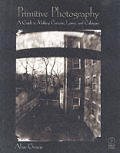
And finally, if you are now chomping at the bit to do some unique stuff with your very own camera you built from scratch... here's a book that will walk you through the process. Good luck, and think about how amazing they would look at 24x30 and 36 x 48.... mmmm, the mind reels.
Primitive Photography considers the hand-made photographic process in its entirety, showing the reader how to make box-cameras, lenses, paper negatives and salt prints, using inexpensive tools and materials found in most hardware and art-supply stores. Step-by-step procedures are presented alongside theoretical explanations and historical background. Streamlined calotype procedures are demonstrated, featuring different paper negative processes and overlooked, developing-out printing methods.

How Fast is "Fast"?

As cameras keep making larger and larger files, photographers are carrying larger CF and SD cards. But size does not equal performance. Along with larger file sizes could come longer write times. manufacturers know that key to the larger files are faster writes, so they are working on the challenges at a feverish pace. Rob Galbraith has a test site where you can see how your cards measure up.
Rob Galbraith DPI: CF/SD Performance Database: "A memory card is a critical component in the professional photographer's digital system. After all, it's the thing that holds the pictures. We hope that the CF/SD Performance Database will, first and foremost, enable you to determine which cards offer the speed your workflow requires. But we encourage you to look at card performance holistically. While speed is important, so is the warranty, tech support and the reputation of the company whose name is on the label."

Unique Frames from Mark Andrew

Mark Andrew photographs families and kids in NY. He also creates his own custom frames from exotic hardwoods. The site shows some of his nice work in the frames. Think of how amazing some custom frames could be around a 24x36 metallic print, or warm-toned black and white.
Mark Andrew Images www.MarkAndrewImages.com

Thursday, July 20, 2006

Are You Listed?

Did you even know about the list? Adobe is an important supporter of our work as photographers. Their professional listing page seems an excellent place to be listed from. You must be a member of a professional organization, but that is the only requirement. BTW... don't put a listing there if you don't have a photo to go with it. (Small thumbnails accompany the listing.) After all, you are, you know... photographers.
Adobe Photographers Directory: "Photographers who want their talent seen by designers, creative directors and image buyers around the world are invited to join this Directory today. You need only be a member of a participating photography association. Just use the authentication code provided by your association to join. Click to view the list of participating associations."

Tuesday, July 18, 2006

Photos To Go - Search Results

Jazz photos for a cool office space.
I am helping a friend of mine put together a nice home office. He lives jazz and music, so I proposed that we make a few large prints for the spaces that need some art. He found this site and it has some nice images. Cheap too. they should print well at 16x24.
Photos To Go - Search Results - Jazz
It started me thinking about finding other musical images for use on your walls, hallways and offices.

Check these cool shots out.

These too...

More royalty-free images of jazz.

Here's a site with lots of images of rock/pop musicians. Send him an email to purchase the file.

Monday, July 17, 2006

10 Things To Do With Big Prints - 1

Part of our series from the "10 Things..." document.

1. Conference Rooms and Lobbies
What a great place for large images. Just imagine how cool a 24 x 48 print would look at the end of your conference room. How about a 36 x 84? Tying it into the theme of the company or the project that is at hand can inspire the interest of all. A calming, soothing image may make client meetings more palatable.
Photographs in the lobby generally go one of two ways; they can reflect the mission of the company, its people or the locale/region of the company – or it may be a totally off-the-wall approach with something that sparks a smile or an inquiry.

Black and White images can make a very dramatic statement in an office that may have some nice colors already, and brilliant, glossy, color images on metallic paper can add some serious pizzazz to an office that may need a little sparkle. Either way, the images should be as large as you can make them, allowing for installation and a little breathing room.

One office I remember had full size black and white images of some of their employees on a pure white background. They were fitted into panels on some of the walls that were visible from the lobby. The lobby also featured a giant photo of someone swinging a golf club, with an interesting crop and some blur. (see the Mightyimaging.com website for more)

Here are a few resources for you.

A Building Lobby, "Way of Design, Book One": "The basic design concept for this lobby calls for better lighting. Symmetrically arranged marble arches illuminate the recessed walls. The antique gold leafed ceiling tiles offset the light and dark travertine marble giving the lobby a subtle richness."
Here is an interesting design.
Book: About 50 new projects will present the new trends of Lobbies as the place of a building to welcome the visitors. It is shown how important the design of this area is to give a first and quick impression of the character of the inner life of a building. The book is divided in the chapters of public buildings like office buildings, banks and hotels. As well private apartment houses will be shown. The projects will be presented in alphabetical order of the designers. As far as available plans will be shown. An index of contact information of the designers and architects is enclosed.
And here is a good post at wbdg.org.
The lobby space type includes foyers, entries to halls, and security screening areas at or near the entrance to a building or demarcated space, and are meant to welcome and direct tenants and visitors, control access, and provide exit ways from buildings. This space type is often designed with both secure and nonsecure areas. The lobby space type does not include elevator lobbies. Building lobbies often serve as the "public face" of building interiors.
And here is a simple gallery.

And one last post to a nice site for architectural work for your lobby.

Photographer Hits the Road...


... and photographs it with love and admiration.

Jim loves this road. He has been fascinated with its long and colorful history and has taken every opportunity to make images of the places it meanders through. And it meanders through the west from Canada to Mexico.

Jim is working on this amazing project on his own, and in the time that he can squeeze out of his busy commercial schedule, and has ways for you to become invloved. See this page on information on how you can be part of of the US Route 89 Project.

And to see some more of his work, view his portfolio and see the gallery at Mighty Imaging.
US Route 89 Appreciation Society: "US Route 89 from Desert to Glacier: A Photographic Exploration of the Geography, History & Culture Along the West’s Most Western Highway

Photographer James Cowlin has begun work on a traveling exhibition and large-format book of photographs of the landscapes along US Route 89. A traveler’s field guide is also planned that will connect the geography and history of the West to places along the road. The project is scheduled for completion by the fall of 2009."

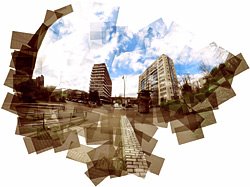
Photojojo » Panographies: Panoramas on Steroids

We can imagine this cool technique for office graphics and lobby graphics. The unique textures that are created with the overlaps would draw viewers in, and the very modern look of the collage would make a strong statement about the company. You could also do some clever mounting and set the whole image up as a float from the wall.

A very nice article on how to prepare your files at PhotoJoJo.
Photojojo » Panographies: Panoramas on Steroids: "Panographies are wide-angle pictures composed of several individual photos manually stitched together. When these component photos are assembled, they give the impression one would get standing in one place, looking around and unconsciously putting the pictures together in one's head."

Friday, July 14, 2006

Need a globe photo?


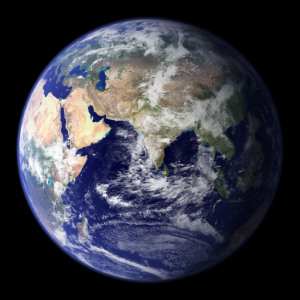
This is a cool composite of both sides of the globe. And if you want it to be printed really, really big... like for a kids room or your office - you know where to send it. (Hint... It's a 'Mighty' good printing company).
Wired News: Hi-Res Earth: "NASA's imaging system MODIS has compiled the most detailed and accurate portrait of Earth, which you can see below. Click on the full-sized link to see a larger image. Even larger, more detailed versions, as well as other MODIS images, can be found at NASA. All images and information are courtesy of NASA."

Really, REALLY Big

But hey... we like big images here at Mighty Imaging.
Wired News: "The photo was created using the centuries-old principle of 'camera obscura' after a gumball-size hole was opened in the hangar's wall, allowing a tiny beam of light to enter.

The image then appeared upside down and flipped left to right on a sheath of light-sensitive fabric the length of one-third of a football field and about three stories tall."

Thursday, July 13, 2006

Still a good format

I spent some quality time with my Mamiya RZ on vacation. Couple of rolls of Fujipan... nice quality time. About 23 minutes... but still - got some nice shots of the pier and such. I like shooting the Mamiya still, even though I have gone mostly digital. Here are some good links for medium format refreshers. (Oh, and if you ever wanted a Hassie... check EBay for some astounding prices...)
U-Medium: "While most pros understand the need for medium format in many situations, amateurs and newcomers to photography can find the subject confusing, and the array of choices available bewildering. Leaf shutters Vs. focal plane shutters, interchangeable backs, format differences, 120 Vs 220 film — all of these are unfamiliar to someone who just works in 35mm.

This tutorial is therefore devoted to explaining the jargon that's unique to medium format, some of the major difference with 35mm, and takes a brief overview of the model choices available. At the end of this page there are links to camera reviews on this site and elsewhere as well as other pertinent web links for those that would like to explore this topic further."
And one or two more.
And the Flickr Pool of course.

Wednesday, July 12, 2006

Amazon Web Services: OnLine Storage


As photographers keep accruing more and more terabytes of images, these services will become more and more affordable. There are many players in this space and I think we will see some photographer niched sites in the near future.
Amazon.com Amazon Web Services Store: Amazon S3 / Amazon Web Services: "Amazon Simple Storage Service (Amazon S3)

Amazon S3 is storage for the Internet. It is designed to make web-scale computing easier for developers.

Amazon S3 provides a simple web services interface that can be used to store and retrieve any amount of data, at any time, from anywhere on the web. It gives any developer access to the same highly scalable, reliable, fast, inexpensive data storage infrastructure that Amazon uses to run its own global network of web sites. The service aims to maximize benefits of scale and to pass those benefits on to developers."
Other players in this space. (via TechCrunch)

Timeless Images: The Sea


Some subjects are simply timeless. We will explore some of the subjects from time to time. This collection of images of the sea will make you long for a beach, a blank card (or roll of film) and some time to ponder the incredible, ever changing sea.
Ocean Pictures, Ocean Wave Photos, and Sea Photos: "The ocean is a phenomenal power. It must be respected and treated with great care. Photographing the ocean is fun: you get to be in a sublime place, and the ocean pictures, ocean wave photos and blue ocean pics will be equally sublime."
Here area few more. Coos Bay Oregon.

More here. Big waves in Laguna.

And a few more from San Diego. At Mighty Imaging, we like big waves.

Tuesday, July 11, 2006

Featured Photographer: David H Smith


(Full disclosure: David is a good friend of mine.)

Last year David was part of the "Through Each Other's Eyes" project here in Phoenix. Loosely explained, it is a photogapher swap... Arizona photographers spend a week in another country and the photographers from that country come here for a week. Yeah, there's more to it than that, but go to the site and read about it.

David went to Ireland. He had a great time in a small town, and captured many images that captivate the imagination. I am lucky enough to have a few large prints in my office at home. They take me to a place I have never been and yet it seems so familar. But, that is what David does. He takes images that make us feel familiar with the subject, as if we've somehow known it before. And yet he offers a little twist that intrigues us. See the shot of the old man on the road... familiar - yes, but there is something more to the image... a feeling of distance and age.

See David's work on his website and visit the gallery at Mighty Imaging.

Monday, July 10, 2006

Simple and Basic...

But all in all, a good little article on the basics of night photography. We MightyImagers live in the heat of the desert, so shooting at night may at least be a bit cooler.
Night photography technique: "With the camera held firmly in place you can fire the shutter and make the most of the long speed. But don't think it's always that easy. Often night photography has huge areas of the scene in darkness with occasional illuminated areas subjects, such as spotlit buildings, moonlit trees, fireworks, fairground illuminations, neon signs etc. The camera's exposure meter isn't used to such scenes and may need some manual help. It's here where the benefits of digital become evident. You can take a picture on auto and preview the scene. If it looks too dark, or the illuminated area is too washed out you simply manually adjust the camera's exposure using the compensation setting and try again and repeat until you have the right balance."
Here is a very cool set on Flickr...

And this from Black's is worth reading.
Fortunately, you can quickly and easily learn how to take better nighttime and low-light photographs and, in the process, learn how to better control your camera so you can take better pictures in all conditions. However, digital cameras do not have a standard interface. Even though cameras from different manufacturers (and even different models by a single manufacturer) may have common features, these features are not implemented in a uniform way. Please read your camera's manual to learn which of these features are available to you, and how to use them. Also, terms may vary from one manufacturer from the next. If you don't find a feature below listed in your camera's manual, it may have another name. Look for a similar function and see if you can use it to accomplish the same thing.
A welcome item may be this nice little night exposure calculator to carry with you.

And here is a rich post over at FredParker.com. Lots to read and know.

Night photography offers a great deal of different effects, as this post over at apogeephoto.com shows.

And a search on Flickr reveals this stunning collection. Enjoy.

Thursday, July 06, 2006

A Nice Intro to 8x10

I have seen a renewed interest in the largest image sizes lately (4x5, 5x7, and 8x10). I love to shoot my 8x10 and scan the neg on my flatbed... 1 to 1. Makes a big file that prints like a dream at 8x10 to 16x20 (after Photoshopping the hell out of it). Getting a scan at the lab renders a much superior neg for printing a more realistic image. This is a good intro piece, and we will have more.
Paul Butzi Photography: "One if the biggest hurdles to getting started in large format photography is that often people contemplating buying their first view camera have no idea of how the thing is actually used in practice, and thus have very little idea of what format they'll like, how much of some movement is enough, how much bellows draw is needed, and so on."

Wednesday, July 05, 2006

Selling Photography on eBay

Try thinking of it as selling "Really Big Prints" on eBay. We have a bias toward big images, you know. The article is a little dated, but still has a lot of info for the beginning eBay photo seller.
Selling Photography on eBay: "Selling Your Photography
You may be a beginner, an advanced amateur, or a professional photographer. No matter what your level of experience, selling your photographs can make a lot of sense. For a pro, sales are your lifeblood, and new markets are always welcome. For amateurs, sales can be a way to buy new equipment, or a path to joining the ranks of the professionals. There are a many kinds of markets for good photographs, but we are going to tell you how to take advance of a unique market that is largely unknown among photographers, the online auction market."

Sunday, July 02, 2006

Scanning

I visited a technology company in LA yesterday on a fairly under the radar meeting (they did give me permission to discuss the art that I saw there). In several offices that were being renovated, there were very large prints of very old photographs. Most of the images were 24 x 30 and 30 x 40. Flush-mounted and printed on a lustre material, the warm-toned black and whites were the perfect antithesis to the work that you would think a tech company does. Ahaa... but you would be wrong. The pictures reminded everyone of the relationship to the past (and of course, data-backup.... get it) I asked where they had gotten the images, and the office manager told me she got them at a flea market and had the lab scan, repair and print. Stunning.

Started me thinking about that box of old images I have and how much I need to scan those to preserve them. Most were taken during the great depression and early 40's.

So for Sunday's relaxing read, some scanning tips from all over the web. Enjoy.
Restoration of genealogy photographs: "This is a 1917 photo, somewhat faded and damaged with a crease. It has been cut into an oval shape, and has the back of an old cardboard frame glued to it. The original is on the left, and the restored image is at the right."
A basic refresher course here.
Digital focus: Scanning old photos
If you're working with prints, you shouldn't try to clean or improve them. It's easy to ruin old photos by over-handling. If your prints are dusty, use a dry cloth to gently wipe away the grime -- and that's all. If something is stuck on, leave it there. Most importantly, never use any kind of liquid to try to clean a photo. If your photo is torn, don't try to fix it with tape -- especially on the print side. Most adhesive tapes discolor over time, and you'll likely end up with a yellowish stripe running across your photo.
This may help as well.
6. ORIGINALS ARE PRICELESS. Never do anything dumb with the original scans. Save them exactly the way they were scanned, without any changes. In other words, when you make each scan, make a copy that you can edit (to rotate, crop, brighten and so on), then save the original scan and store your originals on CD. "Original" means the exact scanned image, before anything has been done to it -- before it is rotated, too. (Rotation sometimes alters the image in ways that can't be fixed.) Don't forget to save your edited scans, too, after you're through.
Now, of course, you have to res them up.
About.com weighs in...
Make Your Photos Bigger With Minimal Loss in Quality
One of the most commonly asked questions in relation to graphics software is how to increase the size of an image without getting blurring and jagged edges. New users are often surprised when they resize an image and find that the quality is severely degraded. Experienced users are all too familiar with the problem. The reason for the degradation is because bitmapped, or raster, image types are limited by their pixel resolution. When you attempt to resize these types of images, your software either has to increase the size of each individual pixel - resulting in a jagged image - or it has to "guess" at the best way to add pixels to the image to make it larger.
Interesting...

Incase you haven't noticed, Photoshop CS offers Bicubic Smoother as one of its interpolation algorithms. Bicubic Smoother is virtually always the best way to increase the size/resolution of your image - including the old wives tale of increasing the size a very slight percentage over and over.

Of course, if you are downsizing your image, choose Bicubic Sharper.

There are many ways to res up an image. I will be checking with my favorite Photoshop Guru, Steve, and get his opinion on the best methods with CSII. I will post his advice at that time.